
Scream Engine
GRAVEL
Capture a vocal take and convert it into hardcore, growl, or shriek — runs on your machine.
Hear it
One voice. Every scream.
Three dry takes — sung, growled and shrieked — each converted by Gravel into Shriek, Growl and Hardcore. Switch while it plays: every version stays locked in time, so you hear only what changed.
DRY
Sung take · no Gravel
Your take
Gravel mode
Vocals by the Gravel Audio developer, recorded dry, then converted with Gravel at 100% intensity. Every version uses the same mix — only the vocal changes — and playback levels are matched so nothing wins by being louder. Keys: space to play, 1–4 to switch, ↑↓ to change take.
Interface
Dark or light, your call
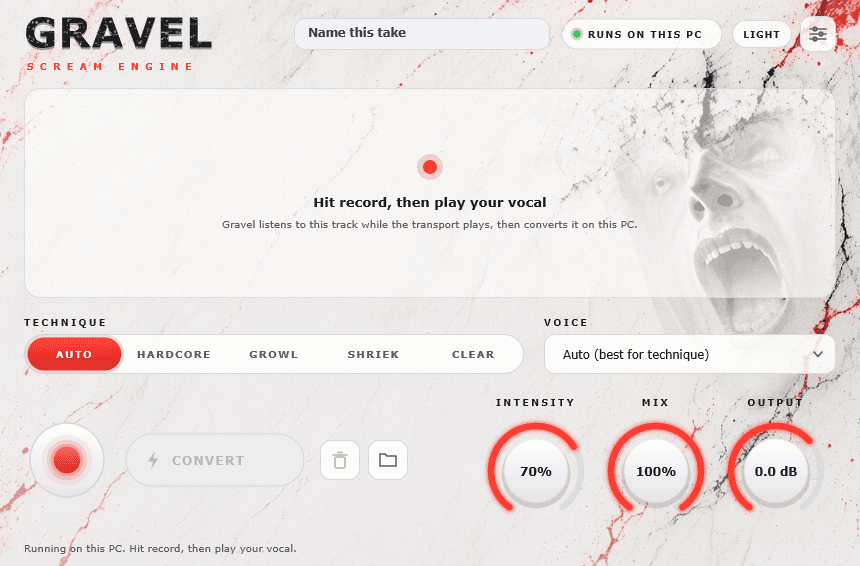
Gravel has the same DARK / LIGHT switch as the rest of the Gravel Audio plugins, and remembers what you picked.
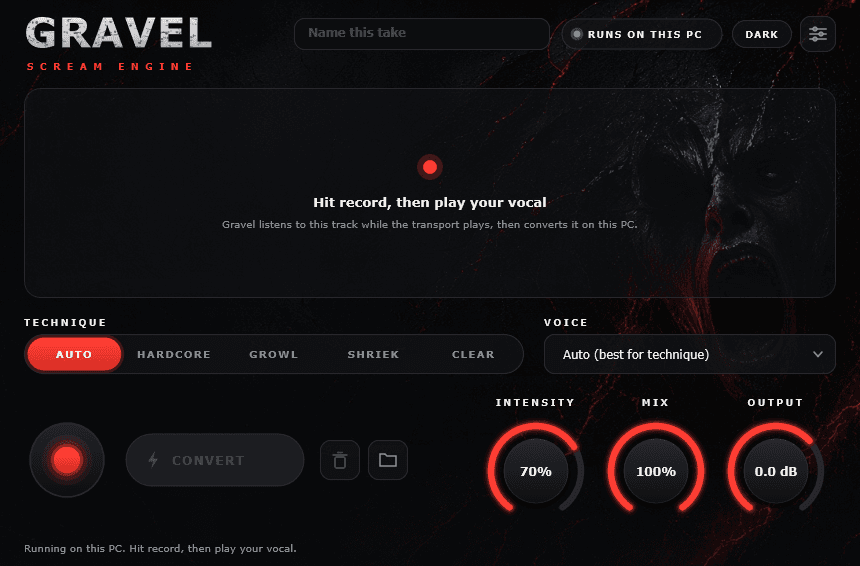
- Record or drop a take, then Convert on your own machine
- Auto, Hardcore, Growl, Shriek and Clear techniques, plus 12 named voices
- Windows: unzip, then run Install Gravel.bat (plugin + scream models)
Convert can take a while on a slower computer. Gravel runs on your machine. A short take is quick on a fast computer and can take several minutes on a slower one. Leave the plugin open — the progress bar is still working.
FAQ
Gravel questions
Can I try it before I buy?+
Yes. Download it and it runs fully for 3 days from the first time you load it — no key, no card. The license panel shows how much time is left. After that, buy a key and paste it in to keep going.
What is Gravel?+
Gravel is a scream engine plugin. You capture a vocal take in the plugin (or feed it audio), hit Convert, and it turns that take into hardcore, growl, or shriek-style output on your own machine — no cloud round-trip while you work.
How do I use it in a session?+
Load Gravel on a vocal track or bus. Record into it or play material through it, then Convert. Use Intensity for how aggressive the result is, Mix to blend dry and wet, and Output to set level. Double-click a knob to reset it. On a slower computer, Convert can take several minutes — leave the plugin open until it finishes.
Why does Convert take so long?+
Gravel runs the scream model on your computer. A short take is quick on a fast machine and can take several minutes on a slower one, or on a long take. That is normal. The progress bar spends most of the time on the first pass, then slows near the end while it finishes. Leave the plugin open until it says the take is converted.
What formats and platforms?+
VST3 on Windows and Mac, plus AU on Mac. Use the downloads on this page for your OS. After the free trial, buy a key and paste it into Settings › License.
Windows says models are missing — what do I do?+
Unzip the full Gravel-Windows download and double-click Install Gravel.bat (allow the admin prompt). That installs Gravel.vst3 and copies the scream models. Don’t only drag the .vst3 file by itself. Then rescan plugins in FL Studio.
Does it need the internet after I unlock?+
No. Paste your key into the plugin once and it runs offline. You only need the key again if you reinstall.
Is there a light mode?+
Yes. Every Gravel Audio plugin has a DARK / LIGHT button in the top bar, and it remembers your choice.
How is Gravel different from Bedrock?+
Gravel is the convert engine — one focused path from take to scream. Bedrock is an eight-module scream chain (clean through space) for shaping extreme vocals with a full rack of modules.
Any tips for better converts?+
Start with a clean, dry vocal (little reverb or delay before Gravel). Leave headroom into the plugin, convert, then ride Mix and Intensity. If it’s too harsh, pull Intensity down or blend more dry with Mix.
GarageBand or Logic asks to lower security settings. Should I?+
Yes. Those apps come from the Mac App Store, so the first time either one loads one of these plugins, macOS asks to lower that app’s security settings. Click Lower Security Settings and enter your Mac password. It asks once per app, then remembers. FL Studio and REAPER do not show this prompt.
Is there a bundle?+
Yes — Everything gets you Gravel, Bedrock and Anvil keys (plus Ash, which is free) for $43.99, less than buying them one by one.
Get Gravel
Try it free for 3 days
Download and use the full plugin for 3 days — no key, no card. Buy a key whenever you’re ready and paste it into the plugin.
Free 3-day trial
- Windows · VST3 —
- unzip, then run Install Gravel.bat. Includes the scream models (about 770 MB).
- Mac · VST3 + AU —
- open the .pkg and follow the installer, then restart your DAW. macOS 11 or later, Apple Silicon and Intel. The first time GarageBand or Logic loads it, macOS asks to lower that app’s security settings. Click Lower Security Settings and enter your password — it only asks once. The installer includes the scream models (about 800 MB).
Buy a license
One key per person, works offline. Your key appears right after checkout — paste it into the plugin.
More from Gravel Audio