
Scream Chain
BEDROCK
Eight modules tuned for extreme vocals: clean, tame, squash, grit, weight, wall, air, space.
No key, no card. The full plugin for 3 days — then $6.99 if you want to keep it.
Hear it
One scream, three chains
A Gravel scream (Forge voice) run through three of Bedrock’s presets. Switch while it plays — every version stays in time, so you hear only what the chain adds.
METALCORE
Bedrock · Metalcore preset
The developer’s shrieked take from Track 3, converted by Gravel (Forge voice, Hardcore), then run through Bedrock’s presets with nothing else added. Levels are matched so no version wins by being louder. Hold to hear it before Bedrock.
Interface
Dark or light, your call
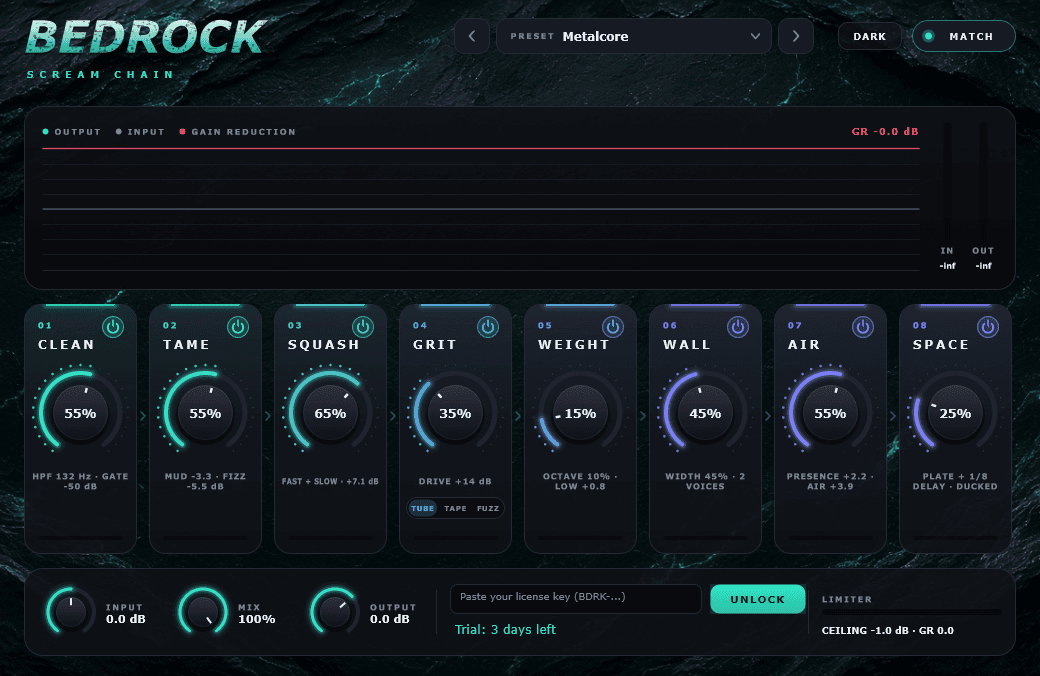
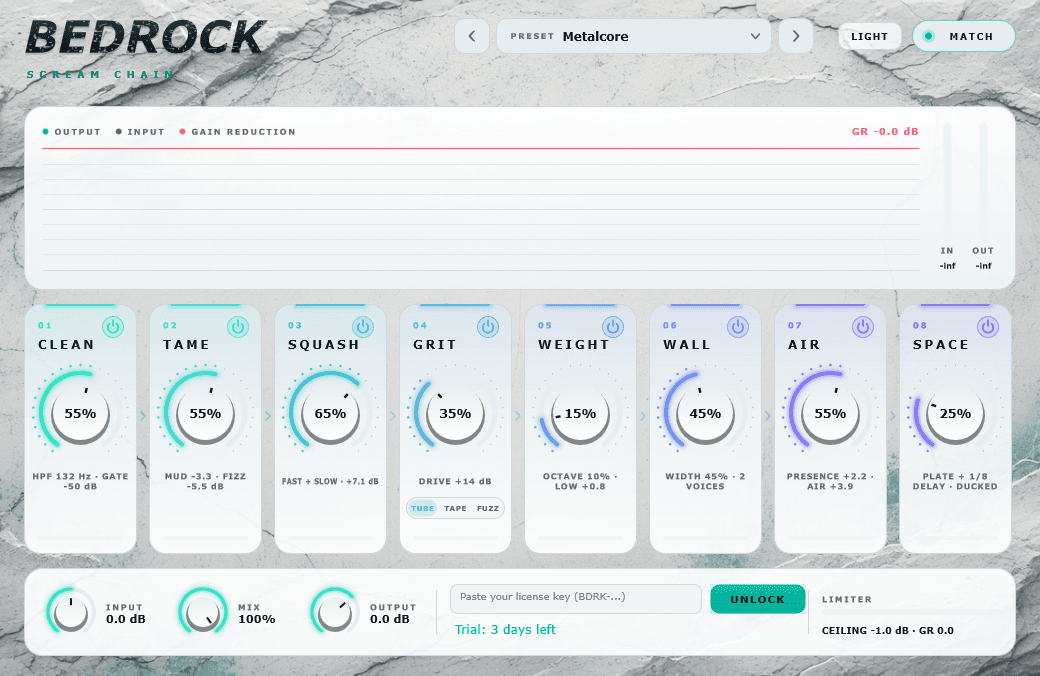
Bedrock has the same DARK / LIGHT switch as the rest of the Gravel Audio plugins, and remembers what you picked.
- Eight modules: Clean → Tame → Squash → Grit → Weight → Wall → Air → Space
- Input / Mix / Output macros, a limiter and live meters for the whole rack
- Presets for metalcore, deathcore and more, built for extreme vocals
FAQ
Bedrock questions
Can I try it before I buy?+
Yes. Download it and it runs fully for 3 days from the first time you load it — no key, no card. The license panel shows how much time is left. After that, buy a key and paste it in to keep going.
What is Bedrock?+
Bedrock is a scream-chain plugin: eight modules in series — Clean, Tame, Squash, Grit, Weight, Wall, Air, and Space — plus Input, Mix, and Output. It’s built to take vocals from controlled to full wall without bouncing between a pile of separate plugs.
What does each module do, briefly?+
Clean tidies the source; Tame settles peaks; Squash compresses hard; Grit adds drive/distortion modes; Weight thickens the low-mid body; Wall pushes width and density; Air lifts presence; Space adds depth. Hover a module in the plugin for the live readout.
How should I start a preset?+
Set Input so you’re hitting the meters without clipping the host, keep Mix around the middle, then bring up Squash and Grit first. Add Weight for body, Wall for size, then Air/Space last. Dial Mix back if the chain is covering the dry performance.
What formats and platforms?+
VST3 on Windows and Mac, plus AU on Mac. Download from this page; after the free trial, buy a key and enter it in Bedrock’s license field.
Offline after activation?+
Yes. Once the key is accepted, Bedrock runs without staying connected. Re-enter the key only if you wipe the install or move machines.
Gravel or Bedrock — which do I want?+
Use Gravel when you want a convert engine that turns a take into a scream performance. Use Bedrock when you already have a vocal (or a Gravel result) and want a dedicated eight-stage chain to crush, grit, and size it.
GarageBand or Logic asks to lower security settings. Should I?+
Yes. Those apps come from the Mac App Store, so the first time either one loads one of these plugins, macOS asks to lower that app’s security settings. Click Lower Security Settings and enter your Mac password. It asks once per app, then remembers. FL Studio and REAPER do not show this prompt.
Is there a bundle?+
Yes — Everything gets you Gravel, Bedrock and Anvil keys (plus Ash, which is free) for $43.99, less than buying them one by one.
Get Bedrock
Try it free for 3 days
Download and use the full plugin for 3 days — no key, no card. Buy a key whenever you’re ready and paste it into the plugin.
Free 3-day trial
- Windows · VST3 —
- unzip and run Install Bedrock.bat, then rescan plugins in your DAW.
- Mac · VST3 + AU —
- open the .pkg and follow the installer, then restart your DAW. macOS 11 or later, Apple Silicon and Intel. The first time GarageBand or Logic loads it, macOS asks to lower that app’s security settings. Click Lower Security Settings and enter your password — it only asks once.
Buy a license
One key per person, works offline. Your key appears right after checkout — paste it into the plugin.
More from Gravel Audio